If you love bite-sized, colorful platformers that lean on straightforward arcade action and old-school charm, Bonkheads is a title you should know. First appearing in the late 1990s, Bonkheads delivers fast-paced 2D platforming with simple controls, dozens of levels, and a lighthearted “troll versus pests” story that’s pure retro fun. Whether you’re hunting classic PC games or building a nostalgia collection for DailyGamesGuide readers, this guide covers everything: history, gameplay, system specs, installation tips, review and score, and frequently asked questions.
Quick facts
- Title: Bonkheads
- Developer / Publisher: 1 A.M. Productions / Aspyr Media (and related re-releases).
- Initial release: Windows (1998); Macintosh versions noted in 1997; later re-releases / HD remakes appeared on mobile platforms.
- Genre: 2D platformer / arcade action
- Players: Single-player (and local co-op options in some versions)
- File size: Very small by modern standards (few MBs for original PC builds) — ideal for lightweight PC setups.

Game overview — gameplay, story, and what to expect
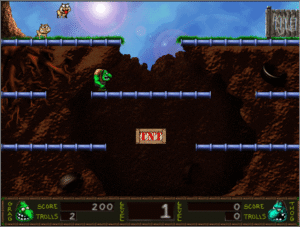
Bonkheads is an arcade-y platformer where you control troll-like heroes (often named Crag and Thog in older documentation) as they battle waves of pests and creatures that threaten their town. The gameplay is honest and uncomplicated: jump on enemies or “bonk” them from above, collect power-ups, and progress through 100+ levels split across themed worlds. Levels are short and often puzzle-lite — focus is on reflexes, timing and mastering enemy patterns. The visual style is cartoonish pixel art — charming, colorful, and easy to read even on modern displays.
Detailed features
- Hundreds of bite-size levels: Many versions list dozens to 144 levels depending on edition — great for short play sessions.
Two-character roster: Playable heroes with slightly different feel — useful for co-op fun. - Power-ups and collectibles: Extra lives, temporary abilities, and level-specific collectibles drive replayability.
- Local co-op (in some versions): Classic couch co-op for two players — rare for many small retro titles.
- Low hardware requirements: Runs on very modest machines — great for retro rigs, netbooks, or virtual machines.
System requirements
- Minimum (original 1997–1998 build):
- OS: Windows 95 / 98 / ME (original). Modern users should run via compatibility mode or DOSBox-like wrappers where needed.
- CPU: Pentium-class CPU (or equivalent)
- RAM: 16–32 MB
- Disk space: 5–20 MB (tiny by today’s standards) — expect compressed downloads around 3–8 MB on abandonware sites.
- Graphics: 2D VGA/SVGA support
- Sound: Standard Windows sound drivers (Sound Blaster compatible recommended)
Recommended for modern PCs:
- OS: Windows 10/11 (use compatibility settings — run installer as Administrator and set compatibility to Windows 98/XP if needed)
- CPU/RAM: Any modern CPU, 2+ GB RAM (overkill but stable)
- Disk space: 50 MB to allow room for wrappers/emulators and save files

How to download and install Bonkheads on a modern Windows PC
Important legal note: Bonkheads is an old title with abandonware presence. Always prefer official storefronts or publisher-authorized re-releases when available. If you choose abandonware sites, verify the file integrity and avoid shady “cracked” executables. The links below point to archived resources and reputable game databases where the title is cataloged.
Step-by-step install (original EXE or archived ZIP):
- Download from a reputable archive. MyAbandonware, MobyGames, or archived pages often host original installers or provide links. (Examples documented in references.)
- Scan the file with antivirus. Always scan any downloaded EXE/ZIP with an AV and run in a sandbox if possible.
- Extract the ZIP (if compressed) and open the installer folder.
- Run the installer as Administrator: Right-click → Run as administrator. If the installer fails, try compatibility mode set to Windows 98/XP.
- If install fails on modern Windows: Use a virtual machine (VirtualBox + Windows XP/98 image) or a compatibility tool like DOSBox-X or ScummVM (if supported). For GUI-based installers, a Windows 98/XP VM is usually easiest.
- Patch resolution / scaling: If the game displays tiny, use windowed mode or a wrapper like DxWnd or run the executable in compatibility mode with DPI scaling disabled.
- Save positions & backup: Keep copies of original installers and documentation for future re-installs.
Mobile / HD re-release: A reworked “Bonkheads HD” or mobile port appeared in app stores in later years — consult official storefronts to buy those editions.

Review & rating — Is Bonkheads worth playing in 2025?
Gameplay: 7.5 / 10
Bonkheads’ core mechanics are simple, approachable and addictive for short sessions. Level design leans on classic arcade repetition — some players find it repetitive, others adore the ‘one-more-try’ loop.
Graphics & audio: 7.0 / 10
Pixel art that holds nostalgic value. On modern screens it’s charming but unpolished compared to contemporary indie platformers.
Content & longevity: 7.0 / 10
With many levels and co-op elements, it provides solid retro value. Replayability depends on whether you enjoy pattern-based platformers.
Overall score: 7.2 / 10 — a solid retro pick for collectors and fans of old-school platformers. If you’re hunting cheap nostalgia or need a lightweight platformer for low-spec systems, Bonkheads delivers.
Pro tips & tricks
- Master the bonk: Jumping and landing precisely is the most reliable way to dispatch enemies while preserving health.
- Learn enemy patterns: Many levels repeat enemy sequences — learning them reduces retries.
- Co-op focused levels: If you have a friend, local co-op makes some boss encounters trivial and more fun.
- Compatibility fixes: Use DxWnd to scale the window and avoid blurry fullscreen. If audio is crackly, change compatibility settings to disable high DPI scaling.
Common issues & troubleshooting
- Installer won’t run on Windows 10/11: Run in compatibility mode for Windows 98/XP or use a VM.
- Game runs too small: Use windowed scaling wrappers (DxWnd) or run on a VM where you control resolution.
- Save files missing: Run the game as Administrator so it can write to Program Files, or relocate saves to a Documents folder.
FAQ
Q: Is Bonkheads free to download?
A: Official availability varies. Some archived abandonware pages offer downloads; official storefront releases (HD/mobile) may be paid. Always prefer official re-releases if available.
Q: Can I run Bonkheads on Windows 10?
A: Yes — but you may need compatibility settings, a VM, or a wrapper.
Q: Is there multiplayer?
A: Some versions support local two-player co-op.